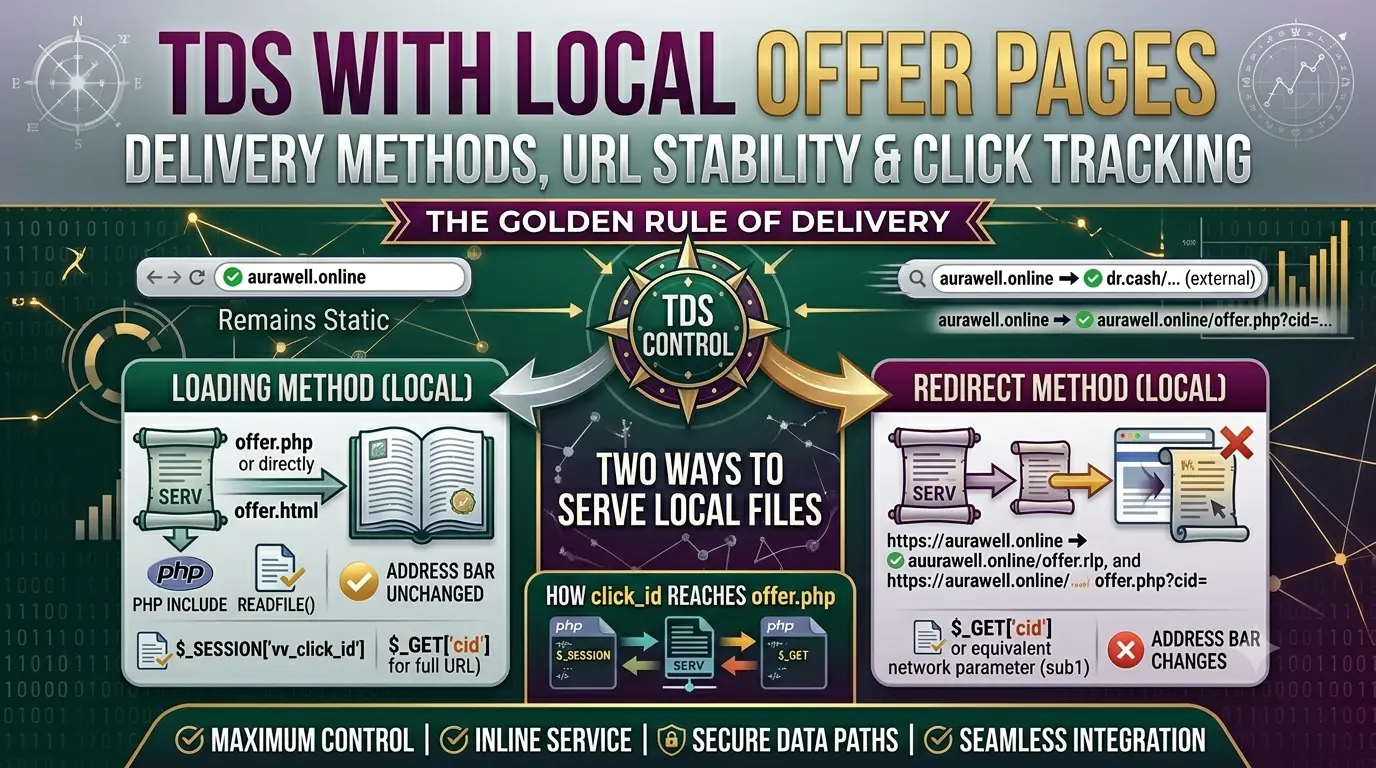
📁 Overview: Two Ways to Serve Your Offer
When a real visitor passes all cloaking filters and TDS picks an offer, CyberCloakTDS can serve that offer in one of three ways: Redirect, Loading, or Iframe. Choosing the right method determines whether the visitor sees your campaign domain or the affiliate network domain in their address bar — and whether your offer file is served locally or fetched remotely.
This guide focuses on the Loading method with local files, which is the most powerful setup for affiliate marketers who want the cleanest visitor experience and full conversion tracking without exposing the affiliate link in the URL bar.
📋 The Three Delivery Methods
| Method | What Happens | Address Bar | Best For |
|---|---|---|---|
| Redirect | Visitor is 301/302 redirected to the offer URL | Changes to destination URL | Affiliate network links (Dr.Cash, AdCombo, etc.) |
| Loading | Offer content is served inline — no redirect | ✅ Stays as your campaign domain | Local PHP/HTML offer files on your domain |
| Iframe | Offer URL shown inside a full-screen iframe | ✅ Stays as your campaign domain | Local files only — most affiliate networks block iframes |
⚠️ Iframe warning: Affiliate network pages (Dr.Cash, AdCombo, etc.) set X-Frame-Options: DENY in their HTTP headers. Putting their links in Iframe mode will show a blank white page to the visitor. Only use Iframe with your own local files hosted on the same domain.
🎯 The Golden Rule
The delivery method you set in the top Offer Page section of the flow applies to all TDS offers. TDS only controls which URL to use — the method (how to serve it) always comes from the top setting.
| Top Offer Page Method | TDS Offer Contains | Result |
|---|---|---|
| Loading | Local file: offer.php or offer.html |
Served inline, address bar unchanged |
| Loading | Same-domain URL: https://yourdomain.com/offer.php?cid={click_id} |
Served inline, address bar unchanged, click_id in GET |
| Redirect | External affiliate link: https://dr.cash/link?sub1={click_id} |
Redirect, address bar changes to affiliate domain |
| Redirect | Mix: local file + external link | Both redirect, address bar changes for both |
🏗️ Example Setup: aurawell.online
Let us walk through a complete real-world example using the domain aurawell.online. The domain has these files:
aurawell.online/
├── index.php      ← downloaded from CyberCloakTDS flow
├── site.php       ← white page (shown to bots and moderators)
├── offer.php      ← real offer for Dr.Cash (Keto India)
├── offer2.php     ← real offer for AdCombo (Keto India)
└── offer3.php     ← real offer for a third network
Flow Settings
| Setting | Value |
|---|---|
| White Page type | Loading (local) → site.php |
| Offer Page type | Loading (local) |
| TDS | ON |
| TDS Offer 1 | offer.php — weight 50% |
| TDS Offer 2 | offer2.php — weight 30% |
| TDS Offer 3 | offer3.php — weight 20% |
What the Visitor Sees
- 📱 Visitor lands on
aurawell.online - 🔍 Cloaking engine checks: country, device, VPN, bot — all pass
- ⚖️ TDS picks offer2.php (30% chance)
- 🔑 click_id
6a2782df8fgenerated and stored in Click Logs - 📄
offer2.phpcontent served inline — no redirect - 🌍 Address bar: aurawell.online — unchanged throughout
Bot or moderator visiting the same URL sees only site.php content. They never know offer.php or offer2.php exist.
🔑 How click_id Reaches Your offer.php
When TDS picks offer.php and serves it inline, the click_id is passed in two ways simultaneously so your PHP code can always access it.
Method 1 — Bare Filename in TDS (offer.php)
If you put just offer.php in the TDS offer URL field, the click_id is available via PHP session and a special GET variable:
// In offer.php
$click_id = $_SESSION['vv_click_id'] ?? $_GET['vv_click_id'] ?? '';
Method 2 — Full Same-Domain URL in TDS
If you put the full URL in the TDS field — https://aurawell.online/offer.php?cid={click_id} — the click_id lands in your named parameter AND in session:
// In offer.php
$click_id = $_GET['cid'] ?? $_SESSION['vv_click_id'] ?? '';
The full URL format is recommended when you want the parameter name to match your affiliate network (e.g., cid, sub1, aff_sub) so you can pass it forward to the network form action without any extra mapping.
Comparison
| TDS Offer URL Format | How to Read in offer.php | Address Bar |
|---|---|---|
offer.php |
$_SESSION['vv_click_id'] |
aurawell.online |
https://aurawell.online/offer.php?cid={click_id} |
$_GET['cid'] |
aurawell.online |
https://dr.cash/link?sub1={click_id} |
Network stores it — returned via postback | dr.cash/... |
🧪 PHP and HTML Files — Both Supported
The Loading method works with both PHP and HTML files. PHP files are included (so PHP code runs). HTML files are served with readfile() (static output, no PHP execution). Both keep the address bar unchanged.
| File Type | How Served | Can Read click_id? |
|---|---|---|
offer.php |
PHP include — full PHP execution |
✅ Yes — $_SESSION and $_GET |
offer.html |
readfile() — raw file output |
❌ No PHP — static only |
For conversion tracking (passing click_id to affiliate forms), always use .php files. HTML-only files are fine for static white pages or simple landing pages that do not need server-side tracking.
🔀 Mixing Local Files and External Links
You can mix local offer files and external affiliate links in the same TDS flow. In this case, set the top Offer Page type to Redirect — this handles both correctly:
| TDS Offer | Weight | What Happens |
|---|---|---|
offer.php |
50% | Redirect to aurawell.online/offer.php?cid=abc123 — offer.php reads $_GET['cid'] |
https://dr.cash/link?sub1={click_id} |
50% | Redirect to Dr.Cash — network stores sub1=abc123, postback returns it |
The trade-off: address bar changes for both offers when using Redirect method. For the local file offer, it becomes aurawell.online/offer.php?cid=abc123 — same domain but path is visible. For the external link, it changes to the affiliate domain.
If keeping the address bar completely unchanged is a priority, use only local files with Loading method. If you are mixing local and external, Redirect is required and the URL will change.
📊 Conversion Tracking With Local Offers
The click_id flow with local offer files works identically to the redirect mode — only the delivery changes. Here is the complete cycle:
- 🙋 Visitor lands on
aurawell.online - 🔑 TDS generates
click_id = abc123— saved to Click Logs - 📄
offer.phpserved inline — reads$click_id = $_SESSION['vv_click_id'] - 📝 Visitor fills form — offer.php sends
click_idto affiliate network (via form action URL or hidden field) - 📣 Network fires postback:
/api/postback.php?cid=abc123&status=approved&payout=21&key=YOUR_KEY - ✅ Click Log updated:
converted=1,payout=21,conversion_status=approved
Passing click_id to Your Affiliate Network Form
In offer.php, read the click_id and embed it in the form action or as a hidden field:
<?php
$click_id = $_GET['cid'] ?? $_SESSION['vv_click_id'] ?? '';
?>
<form action="https://dr.cash/lead?sub1=<?= htmlspecialchars($click_id) ?>" method="POST">
  <!-- your form fields -->
</form>
Or with a hidden input if the network reads it from POST body:
<input type="hidden" name="sub1" value="<?= htmlspecialchars($click_id) ?>">📝 Complete Setup Checklist
- Upload
index.php(downloaded from flow),site.php,offer.php,offer2.phpto your campaign domain root - Flow: White Page = Loading →
site.php - Flow: Offer Page type = Loading (for local files only)
- TDS ON: add offers with filenames or full same-domain URLs, set weights totalling 100%
- In each
offerN.php: read$_SESSION['vv_click_id']or$_GET['cid'] - Pass that click_id to your affiliate network form action URL
- Set postback URLs in the network with your postback key
- Re-download
index.phpafter saving and re-upload - Test from a non-whitelisted device — check Click Logs for click_id generation
- Confirm address bar stays as your campaign domain throughout the session